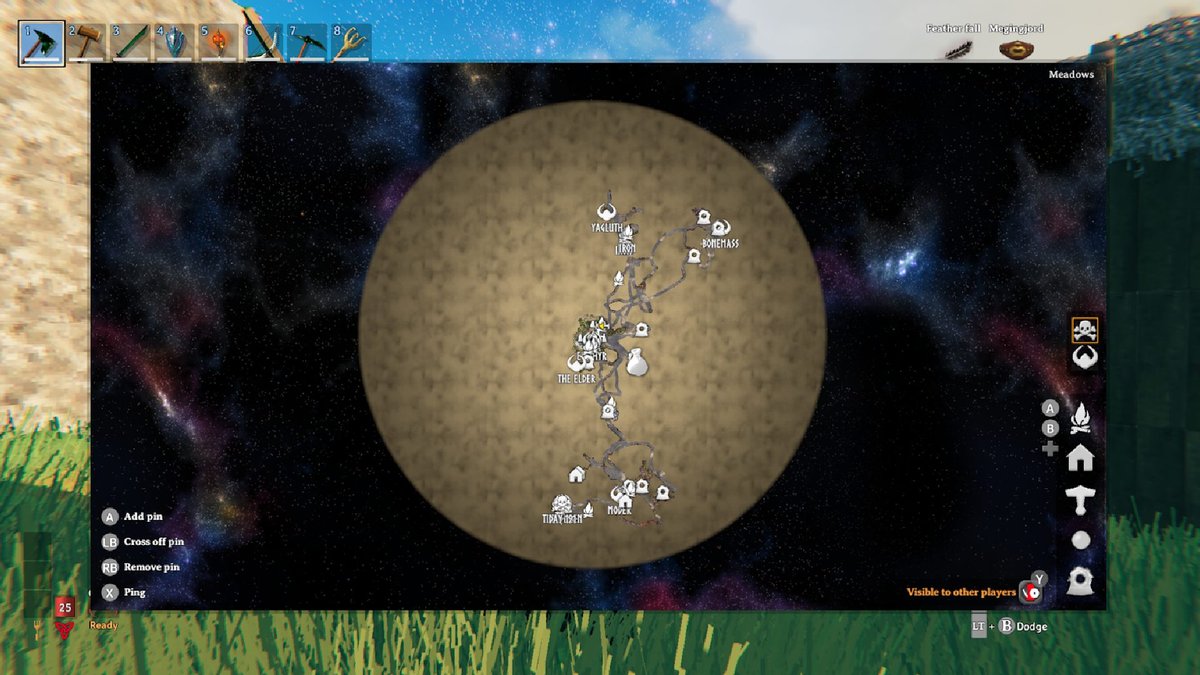
Valheim. The very name evokes images of mist-shrouded forests, colossal boss battles, and the satisfying clang of hammer on anvil. But what if your Viking saga felt… a little too familiar? What if you yearned for a world that truly resonated with your specific vision – a realm where biomes offered richer spoils, resources were tuned to your playstyle, and Points of Interest (PoIs) felt fresh and challenging? You’re in luck, because Customizing Your Valheim World: Biomes, Resources & POIs is not just possible, it’s a game-changer.
Forget the days of accepting whatever seed the game tossed your way. Today, we're diving deep into the art and science of tailoring your Valheim experience, from adjusting global game rules to exploring the frontiers of what's possible with community tools. Whether you’re a solo builder craving endless resources or a server admin orchestrating a brutal survival challenge, your ultimate Valheim adventure begins here.
At a Glance: Your World, Your Rules
- Official World Modifiers are Your First Stop: Valheim now has built-in tools to tweak core gameplay aspects like enemy difficulty, resource drops, stamina usage, and death penalties. No mods required!
- Valhost World Modifier Tool: This external, safe tool is your best friend for easily editing these official modifiers in your existing world save files.
- Modding for New Biomes/PoIs is Tricky: While official modifiers change how you interact with biomes, adding entirely new biomes, structures, or dungeons via mods can be unstable and challenging to keep updated. Approach with caution and realistic expectations.
- Always Back Up Your World: Before making any changes, always, always, always copy your
dedicated.fwlanddedicated.dbfiles. This is your insurance policy. - Communicate on Servers: If you're a server admin, be transparent with your players about any world modifications to ensure a fair and enjoyable experience for everyone.
The Heart of Your Valheim World: Understanding Official Modifiers
Before we jump into the nitty-gritty of tweaking files, let’s talk about the incredible power already baked into Valheim: World Modifiers. These aren't third-party hacks; they're official, built-in settings that let you fundamentally alter how your game world behaves. Think of them as the DNA of your Valheim experience, defining everything from how tough a Greydwarf is to how much wood you get from a tree.
These modifiers are crucial because they offer a stable, supported way to customize without the headaches often associated with mods. They directly impact your gameplay on a global scale, meaning every player on your server (or just you in single-player) will experience the adjusted settings. And the best part? These changes are saved directly into your world file, specifically the dedicated.fwl file, ensuring consistency.
So, what exactly can you twist and turn with these powerful dials? Let's break down the categories:
1. Enemy Difficulty: Crafting Your Challenge
This is where you decide if Valheim is a leisurely stroll through the meadows or a brutal, desperate fight for survival.
- Enemy Health: Want every Fuling to feel like a mini-boss? Crank up their HP. Prefer to clear camps quickly? Dial it down.
- Enemy Damage: Determine how hard those Skeletons hit. Perfect for making PvP more intense or creating a more forgiving PvE environment.
- Enemy AI: While not a direct modifier in the Valhost tool, remember that base Valheim AI has its quirks. Modifiers impact their effectiveness, not their core behavior.
Why it matters: If you're tired of steamrolling bosses, increase their health and damage. If you're building a massive base and just want to gather resources without constant interruptions, lowering enemy stats can be a godsend. It's about finding that sweet spot between challenge and enjoyment.
2. Resource Gathering: Fueling Your Ambition
Resource gathering is the backbone of Valheim progression. These modifiers let you fine-tune the grind.
- Resource Multiplier: This is a big one. Want more wood, stone, copper, or iron from each node? Increase the multiplier. This is incredibly useful for creative builds, massive server projects, or simply reducing repetitive farming. Imagine getting twice the ore from a single copper deposit – that's some serious efficiency!
- Durability Drain: How quickly do your tools, weapons, and armor wear down? Reduce durability drain for a more relaxed playstyle, or increase it for a more hardcore survival challenge where maintenance is key.
Why it matters: Resource multipliers dramatically affect your time investment. A 2x multiplier can halve the time you spend mining or logging, freeing you up for exploration or building. Conversely, a 0.5x multiplier forces you to work harder, making every gathered resource feel more valuable.
3. Stamina & Food: The Rhythm of Survival
Stamina and food management are fundamental to Valheim's gameplay loop.
- Stamina Drain: How quickly do you lose stamina when running, jumping, or attacking? Lowering this makes combat and travel feel much smoother, while increasing it can create a more deliberate, tactical experience.
- Food Usage: How quickly do your food buffs deplete? Adjusting this impacts how often you need to eat, directly affecting the pace of the game. A slower drain means less time spent cooking and more time adventuring.
Why it matters: These settings dictate the overall pace and "feel" of movement and combat. If you want a fast-paced hack-and-slash, reduce stamina drain. If you prefer a more methodical, survival-focused game, make every move count by increasing it.
4. Death Penalties & Progression: Raising (or Lowering) the Stakes
Valheim's death penalty is iconic. Modifiers allow you to soften the blow or make dying a truly terrifying prospect.
- Death Penalty Multiplier: Determines how much you lose upon death. You can set it to lose nothing, or make it devastating.
- Skill Loss: How much skill progress do you lose when you die? Adjust this to make death either a minor setback or a significant hurdle to overcome.
- Progression Rules: These can impact how quickly players advance through the game, though direct modification here is usually less about specific biomes and more about overall game balance.
Why it matters: This is about risk and reward. A harsh death penalty can make players more cautious and strategic, while a lighter one encourages bolder exploration and experimentation, especially on servers where new players might struggle.
The Power in Your Hands: Editing World Modifiers Safely with Valhost
Now that you understand what you can change, let's get to how. While you technically could try to decode the dedicated.fwl file (it's not human-readable, and we strongly advise against it as it can corrupt your world), the community has developed a brilliant, safe tool: the Valhost World Modifier Tool. This web-based utility acts as a translator and editor, giving you a friendly interface to tweak your world's settings.
Here’s your step-by-step guide to transforming your Valheim world:
Step 1: Locate Your World Save File
First, you need to find the dedicated.fwl file for your specific world.
- For most users (Windows): Navigate to
%USERPROFILE%\AppData\LocalLow\IronGate\Valheim\worlds_local. You can typically type%USERPROFILE%\AppDatainto your Windows search bar and then navigate from there. - For Linux/Servers: The path is usually
~/.config/unity3d/IronGate/Valheim/worlds_local. - Inside this folder, you'll find files named after your Valheim worlds (e.g.,
MyAwesomeWorld.fwl,MyAwesomeWorld.db). You're looking for the.fwlfile.
Step 2: Make a Full Backup!
This step is non-negotiable. Before you do anything else, copy both your dedicated.fwl and dedicated.db files to a safe place (like a new folder on your desktop labeled "Valheim Backup"). If something goes wrong, this backup is your lifeline. Seriously, don't skip this.
Step 3: Access the Valhost World Modifier Tool
Open your web browser and go to the Valhost World Modifier Tool website (a quick search for "Valhost Valheim World Modifier Tool" should lead you there).
Step 4: Upload Your dedicated.fwl File
On the Valhost tool's page, you'll see an option to upload your dedicated.fwl file. Click "Choose File" and select the dedicated.fwl from the worlds_local folder. The tool will then process it and display your current world modifiers in a clear, readable format.
Step 5: Customize Your Settings
Now for the fun part! Use the dropdowns, sliders, and input fields provided by the Valhost tool to adjust your desired options.
- Want more resources? Increase the "Resource Multiplier."
- Tired of constant healing? Slow down "Food Usage."
- Making a creative build server? Reduce "Stamina Drain" to almost nothing and lower "Enemy Health" significantly.
Take your time, experiment with the settings, and envision the gameplay experience you want to create.
Step 6: Download Your Modified File
Once you're happy with your new settings, click the "Save" or "Download" button on the Valhost tool. It will generate and download a new dedicated.fwl file to your computer.
Step 7: Backup Original & Replace Files
- Go back to your
worlds_localfolder. - Rename your original
dedicated.fwlfile (e.g., todedicated.fwl.old). This keeps it as another layer of backup without deleting it. - Place the newly downloaded, modified
dedicated.fwlfile into theworlds_localfolder. Ensure it has the exact original name (e.g.,MyAwesomeWorld.fwl).
Step 8: Relaunch Valheim
Start your Valheim game or server. Your new world modifiers should now be active! Jump in and test out the changes. You might notice the difference immediately, especially with resource drops or enemy encounters.
Actionable Tip: Make small, incremental changes at first. Don't try to change everything at once. Test one or two settings, see how they feel, then go back and adjust more if needed. This makes troubleshooting much easier if something doesn't feel right.
When Official Isn't Enough: Tackling Biomes, POIs, and Modding Challenges
The official world modifiers are fantastic for gameplay tweaks, but what if your grand vision includes entirely new biomes, unique Points of Interest, or unexplored dungeons that Valheim doesn't natively offer? This is where the world of modding comes into play, and it's also where things get a bit more complex.
The ground truth is that while the Valheim modding scene is vibrant, finding current, working, and stable mods that introduce truly new biomes or a significant overhaul of PoIs can be challenging. Many biome-altering or major structure-adding mods are often:
- Outdated: Valheim receives regular updates, which can frequently break older mods, especially those that tinker with core world generation or asset loading.
- Experimental: Some mods might be in early development, leading to bugs, crashes, or incomplete features.
- Client-Side vs. Server-Side: Mods that add new assets (like new PoI structures) often require all players on a server to have them installed, which can be a logistical headache. Mods that change world generation parameters might need careful server-side configuration.
While official modifiers can indirectly affect how you interact with biomes (e.g., more resources make a swamp less "hostile" for gathering), they don't introduce entirely new ones.
The Reality of "New" Biomes and PoIs via Mods:
If your heart is set on truly novel biomes or extensive new dungeons, you'll need to explore modding communities like Thunderstore or Nexus Mods. Be prepared for:
- Extensive Research: Look for mods that explicitly state compatibility with the latest Valheim version. Read comments and reviews for feedback on stability.
- Mod Managers: Using a mod manager like Thunderstore Mod Manager or r2modman is highly recommended. They simplify installation, updating, and dependency management, significantly reducing conflicts.
- Trial and Error: Expect to install, test, and potentially uninstall several mods before finding one that works for your setup and meets your expectations. Always back up your world before installing new mods.
- Community Support: Engage with the modding community. Often, other players can offer troubleshooting tips or suggest alternatives.
What to look for:
Focus on mods that aim to enhance existing biomes with more varied vegetation or subtle structure additions, or those that focus on procedural dungeon generation rather than entirely new biome types. Large-scale biome additions are typically the most difficult to maintain.
Finding Your Perfect World Seed: An Alternative Approach
Sometimes, the best "customization" isn't about changing existing worlds or adding new biomes, but about finding the perfect starting point. Valheim's world generation is incredibly robust, and different seeds can lead to wildly diverse map layouts, biome distributions, and PoI placements.
Instead of fighting the game's core generation, consider using a Valheim map generator. These external tools allow you to input a seed (or generate random ones) and preview the entire map, including biomes, boss locations, merchant spawns, and key resources.
How this helps with customization:
- Biome Variety: You can hunt for seeds where all biomes are relatively close, or ones that present a massive journey to reach the Deep North or Ashlands.
- Resource Distribution: Find seeds where specific ore types are abundant near your spawn, or where ancient forest biomes are plentiful for wood.
- POI Placement: Locate seeds with multiple Burial Chambers or Sunken Crypts close to your base, or an abundance of various abandoned structures to explore.
While not direct modification, carefully selecting your world seed is a powerful form of customization that sets the stage for your entire playthrough. It lets you "customize" the potential of your world without touching a single file.
Crafting Your Ideal Valheim Experience: Best Practices and Pitfalls
Successfully customizing your Valheim world isn't just about knowing how to click buttons; it's about a mindful approach. Here are some best practices and pitfalls to avoid:
1. Always, Always Backup Your World Files
We cannot stress this enough. Before using the Valhost tool, before installing any mod, before making any change, copy your .fwl and .db files. If things go sideways, you'll be eternally grateful for that backup. Save yourself the heartbreak of a corrupted world.
2. Make Small, Incremental Changes
Think like a scientist. Change one or two settings, test them thoroughly in-game, then adjust further. Trying to overhaul everything at once makes it nearly impossible to pinpoint which specific change caused an issue or if something isn't working as intended.
3. Inform Server Players of Modifications
If you're running a multiplayer server, transparency is key. Your players need to know if you've made enemies harder, resources scarcer, or death penalties more severe. This prevents frustration and ensures everyone is on the same page about the "rules" of your customized realm. Surprising your friends with a 5x death penalty is a quick way to lose players!
4. Understand How Modifiers Affect Progression
Doubling resource drops might make the early game a breeze, but it could also trivialise the mid-game grind, potentially reducing the sense of accomplishment. Conversely, making enemies tankier might extend the progression curve considerably. Consider the long-term impact on your gameplay loop and player experience. Do you want a faster progression or a more drawn-out, challenging one?
5. Be Realistic About Modding for New Biomes/PoIs
As discussed, achieving truly new biomes or vast, custom dungeon systems through mods is often a complex and unstable endeavor. Manage your expectations. Focus on quality-of-life mods, graphical enhancements, or minor content additions first, and only venture into major world-altering mods if you're prepared for potential troubleshooting. Sometimes, a beautiful new texture pack for existing biomes can feel just as fresh as a completely new one.
6. Test Your Changes Thoroughly
Don't just launch the game for five minutes and assume everything is fine. Spend some real time exploring the affected areas. Gather resources, engage enemies, cook food, die (if you've changed penalties!). Ensure the new settings create the experience you intended.
7. Keep Up With Valheim Updates
If you're using mods, always check their compatibility after a major Valheim patch. Developers often update the game, which can break mods that rely on specific game code. Official world modifiers, being built-in, are generally unaffected by game updates, which is a major advantage.
Your Journey, Your Valheim: Final Thoughts on Tailoring Your Realm
Valheim offers an incredible journey, and the ability to customize its core mechanics and even the very fabric of its world empowers you to craft an experience truly unique to you or your community. From fine-tuning enemy encounters and resource abundance with official world modifiers to thoughtfully selecting a world seed that lays the perfect groundwork, you are the architect of your Viking destiny.
Embrace the tools available, proceed with caution (especially when modding!), and always remember the joy of discovery and creation. Whether you're building an impenetrable fortress with boundless resources or battling against overwhelming odds in a brutal survival scenario, your customized Valheim world awaits. Go forth, Viking, and make it your own!