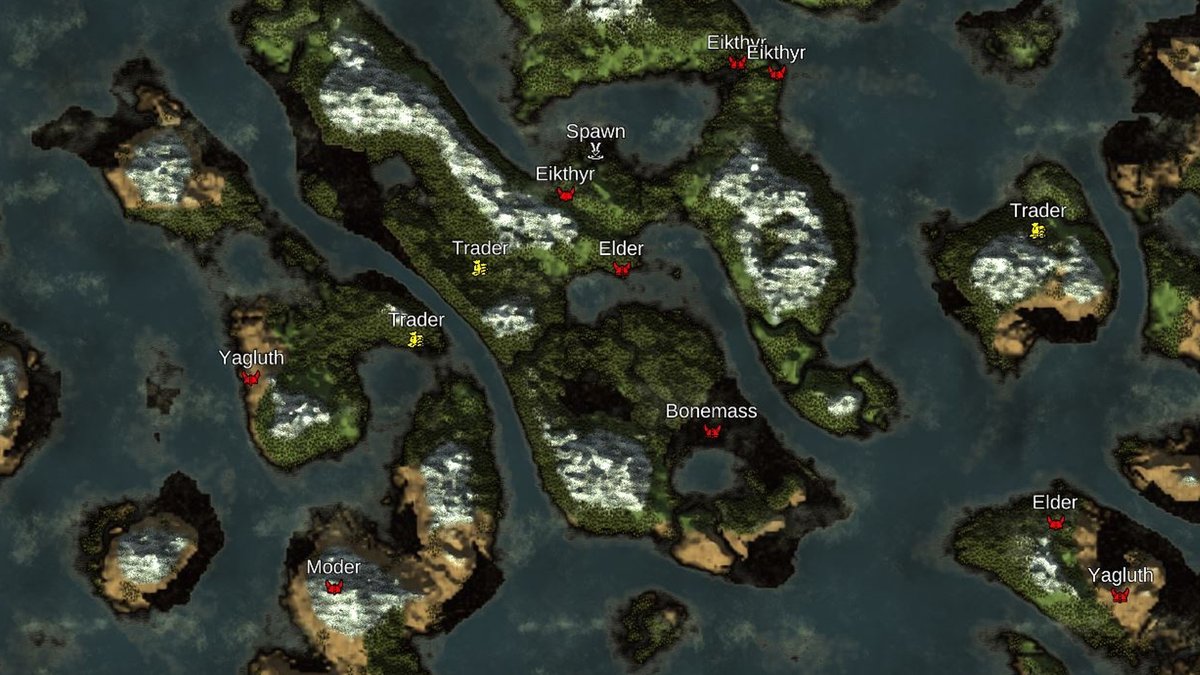
Imagine having the power to sculpt your Valheim destiny even before your boots touch Norse soil. That's precisely what Understanding & Using Valheim Map Seeds offers: a direct hand in shaping the very foundation of your Viking saga. These unique strings of characters are more than just random codes; they're the DNA of your Valheim world, determining everything from the placement of ancient forests to the proximity of terrifying bosses and precious resources. With the right seed, you can embark on a tailored adventure, whether you're a speedrunner aiming for quick boss kills, a builder dreaming of vast meadows, or a hardcore survivor seeking an immediate challenge.
This guide will demystify Valheim seeds, show you how to find them, harness their power, and even modify your experience to create the ultimate Viking realm.
At a Glance: Your Valheim Map Seed Essentials
- What It Is: A unique code that defines your entire Valheim world's layout, biomes, resources, and boss locations.
- Finding Your Seed: Use F2 in-game, or locate world files (
.db,.fwl,worldinfo.json) for dedicated servers. - Using a Seed: Enter your desired code when creating a new world. Seeds are permanent once generated.
- Essential Tools: Online map previewers (like Mapgenie.io, valheim-map.world) let you explore a world before playing it.
- Why Use Them? Tailor your game for specific playstyles: speedrunning, base building, resource gathering, or extreme challenges.
- Best Practice: Always preview a seed with a map tool and consider backing up your world regularly.
What Exactly Is a Valheim Map Seed?
At its heart, a Valheim seed is a unique alphanumeric string that acts as your world's complete genetic blueprint. Every single detail — from the rolling hills of the Meadows to the treacherous depths of the Mistlands, the placement of boss altars, the density of crypts, and the distribution of crucial resources like copper and iron — is meticulously determined by this one string.
Think of it like this: enter the same seed, and you'll get the exact same world, down to every rock and tree. This incredible consistency means you can meticulously plan your adventure, strategize resource runs, or even share a perfectly crafted world with friends, ensuring everyone experiences the same foundational challenges and opportunities. Different seeds yield radically different worlds, making some inherently more advantageous or challenging depending on your desired playstyle.
Unearthing Your World's Identity: Finding Your Current Seed
Curious about the origins of your current Valheim kingdom? Or perhaps you've stumbled upon a truly fantastic world and want to share its unique layout with others? Finding your world's seed is straightforward, whether you're playing solo or on a dedicated server.
In-Game Discovery
For most players, the simplest method is built directly into Valheim:
- While in your game world, simply press the F2 key.
- A small overlay will appear, displaying your current world's name and, critically, its unique seed string. Jot it down, screenshot it, or commit it to memory!
Locating Seeds on Dedicated Servers
If you're running a dedicated server, finding the seed requires a quick dive into your server's file directory:
- For Linux Servers: Navigate to
~/.config/unity3d/IronGate/Valheim/worlds/ - For Windows Servers: Look in
AppData\LocalLow\IronGate\Valheim\worlds(you might need to enable "show hidden files" to seeAppData).
Once you're in the correctworldsfolder, you'll find files associated with each of your server's worlds, typically with.dbor.fwlextensions. You can often open these files with a text editor, or, more reliably, load them into a Valheim map viewer tool (which we'll discuss shortly). Sometimes, the seed is also conveniently stored in aworldinfo.jsonfile within the same directory.
Planting a New World: How to Use a Valheim Seed
Once you have a specific seed in mind – maybe one you've found online, generated randomly, or discovered from a friend's world – applying it to a new game is incredibly easy.
- Launch Valheim: Start the game as usual.
- Select "Start Game": From the main menu, choose to start a new game.
- Create New World: You'll be prompted to either select an existing world or create a new one. Choose "New."
- Enter Your Seed: In the "Create World" menu, you'll see a field labeled "Seed" (or similar). This is where you'll type or paste your chosen seed string. Ensure accuracy; even a single character difference will generate an entirely different world!
- Name Your World: Give your new world a memorable name.
- Start Your Adventure: Click "Start" or "Create World," and Valheim will generate your new realm based on that specific seed.
Important Note: A world's seed is locked in at the moment of creation. You cannot change the seed of an existing world. If you want to use a different seed, you'll need to generate a completely new world. This makes the initial seed choice a critical decision for any long-term Viking settlement.
Your Cartographer's Toolkit: Essential Valheim Seed Tools
Choosing a seed without knowing what kind of world it generates is like buying a house sight unseen. Fortunately, the Valheim community has developed incredible tools that act as your personal cartographer, allowing you to preview entire worlds before you even step foot in them. These tools are indispensable for any seasoned or aspiring Viking.
Valheim Map Preview Tools
These web-based applications are your secret weapon for finding the perfect world. They'll render a full, zoomable map of any given seed, revealing all its secrets:
- Valheim World Generator Seed Searcher
- Mapgenie.io
- valheim-map.world
What these tools show you: - Full World Map: See the entire landmass, oceans, and archipelago layout.
- Biome Distribution: Identify where Meadows, Black Forests, Swamps, Mountains, Plains, Ashlands, and Mistlands are located. This is crucial for planning progression.
- Boss Locations: Pinpoint the exact altars for Eikthyr, The Elder, Bonemass, Moder, and Yagluth.
- Points of Interest (POIs): Discover critical landmarks like:
- Spawn Points: Where you'll initially appear.
- Resource Veins: General locations for copper, tin, silver, and iron.
- Crypts & Tombs: Essential for obtaining Surtling Cores and Iron.
- Runestones: Important lore and location hints.
- Haldor the Trader: His potential spawn locations, simplifying your search for the elusive merchant.
- Customization: Many tools allow you to toggle specific POIs, add custom markers, and even export your personalized maps for easy reference during gameplay.
Using a Valheim map generator or preview tool is a crucial first step for anyone serious about optimizing their Valheim experience. You can avoid tedious exploration, find optimal base locations, and plan your entire progression path with unparalleled efficiency.
Seed Generators
While Valheim itself doesn't offer custom terrain editing, seed generators do allow you to experiment with various strings. Often, these tools let you input random words or phrases, which they then convert into a unique Valheim-compatible seed string. You can then take that generated string and plug it into one of the map preview tools mentioned above to see what kind of world your chosen words have manifested. It's a fun way to discover genuinely unique or surprising world layouts.
Crafting Your Ideal Realm: Best Valheim Seeds & Their Use Cases
The true magic of Valheim seeds lies in their ability to cater to virtually any playstyle. Below, we've curated a selection of highly regarded seeds, categorized by the type of adventure they best support. Remember to always preview these with a map tool before committing!
For Speedrunners & Early Boss Hunters
If your goal is to conquer Valheim's challenges as quickly as possible, minimizing travel time between bosses is key.
HHcLC5acQt: This seed is a speedrunner's dream. All five boss biomes are located remarkably close to the starting point, allowing for rapid progression through the game's main objectives. You'll spend less time sailing or trekking and more time fighting and gearing up.
For the Budding Viking (Beginners)
Starting Valheim can be overwhelming. A gentle, forgiving world allows new players to learn the ropes of building, crafting, and survival without immediate, punishing threats.
Odin: A classic for a reason. This seed boasts a vast, spacious starting landmass, usually a Meadows biome, teeming with early-game resources. It's perfect for new players to establish a robust first base, experiment with building mechanics, and gather essential materials in relative safety before venturing into more dangerous territories.
For the Resourceful Hoarder & Master Crafter
Are you the type who loves to gather every possible resource, build elaborate crafting stations, and ensure an endless supply of materials? Certain seeds make resource acquisition significantly easier.
SurtlingsRUs: As the name suggests, this seed is excellent for Surtling Core farming. It tends to feature numerous Surtling spawners and crypts, which are vital for crafting furnaces and portals.SwampSanctuary: Navigating the Swamp for iron can be a perilous endeavor. This seed often provides "safe zones" or more manageable layouts within Swamp biomes, making it easier to establish temporary comfort bases and efficiently farm iron without constantly battling leeches and draugr.
For the Grand Architect & Aesthetic Visionary
Some Vikings come to Valheim not just to conquer, but to create. For those who dream of sprawling castles, scenic villages, or meticulously planned outposts, flat, open land is paramount.
over9000: This seed is renowned for its gigantic central Meadows biome. This sprawling, relatively flat expanse offers unparalleled opportunities for large-scale base construction, allowing builders to unleash their creativity without being constrained by terrain.ChillMeadows2025: Offers giant, remarkably flat zones right near your spawn point. This is a builder's paradise, providing clear canvases for elaborate structures, farms, and intricate layouts from the very beginning of your journey.IX7JpLYpLd: For those who appreciate natural beauty alongside functional building spaces, this seed often generates stunning landscapes featuring picturesque mountains, serene lakes, and diverse biomes. Crucially, the boss altars aren't too far apart, balancing aesthetics with progression.
For Balanced, Long-Term Adventures
If you're planning a long-running server or a single-player journey where exploration and natural progression are key, a balanced world layout is ideal.
IGotU2025: This seed provides an excellent balance, ensuring that all major biomes are accessible primarily by walking or short boat trips. This fosters a sense of interconnectedness across the world, making long-term exploration and resource gathering feel more organic and less like endless sailing.
For the Hardcore & Combat-Oriented
Do you crave immediate danger, brutal challenges, and worlds that test your mettle from the get-go? These seeds are designed to throw you into the thick of it.
42069lolxd: This seed is for the true survivalist. It frequently features Swamps and Mountains very close to the starting area, forcing early encounters with dangerous creatures and demanding quick adaptation and strategic thinking.PlainsCentral: A truly brutal challenge. This seed often spawns you with the deadly Plains biome circling the map's center. Prepare for immediate encounters with Deathsquitos and Fulings, demanding expert combat skills and lightning-fast reflexes from your first moments. Not for the faint of heart!yfNmtqZ5mh: This challenge seed places you on a tiny, isolated patch of Meadows. Your brief respite is quickly over as you are forced into the dark, dangerous Black Forest biome almost immediately, pushing your survival skills to their absolute limit.
For Specific Encounters (e.g., Trader Hunt)
Sometimes, you just want to find one particular NPC or location without extensive searching.
Haldor1: If your primary goal is to unlock the Trader, Haldor, and gain access to his unique wares (like the Megingjord belt), this seed often spawns you relatively close to one of his potential locations. This streamlines your early-game trade and allows you to buy essential items much sooner.
For the Uniquely Challenged & Rare Explorers
These seeds offer truly unique or rare starting conditions, providing an experience far removed from the typical Valheim journey.
MistlandsFirst: An extremely rare and utterly challenging seed. This can spawn you directly into the Mistlands biome, which is normally a late-game, highly dangerous area. This offers an unparalleled early-game challenge, suitable only for the most masochistic and experienced Vikings.DeepOceanSeed: For those who truly wish to embrace the high seas, this seed generates a world consisting primarily of scattered ocean islands. It's an ideal canvas for master shipbuilders, naval warfare enthusiasts, and anyone who dreams of a life defined by sailing and island hopping.
Nurturing Your Digital Garden: Best Practices for Long-Term Worlds
A truly great Valheim world can last for hundreds of hours. To ensure your chosen seed remains enjoyable and functional over the long haul, consider these best practices:
- Always Preview Before You Play: Seriously, use one of the map seed tools (like Mapgenie.io) to visually inspect your potential world. This allows you to spot potential issues, like bosses being excessively far apart or a lack of crucial biomes near spawn, before you invest hours into it.
- Test Seeds in Creative Mode First: If you're unsure about a seed or want to experiment with specific build sites, create a temporary world using that seed in Valheim's creative (debug) mode. This lets you fly around, explore freely, and test concepts without resource grinding.
- Regularly Back Up Your World Files: This cannot be stressed enough. Your world's
.dband.fwlfiles are precious. Make copies of them weekly, or even more frequently, especially if you're experimenting with new seeds, mods, or large builds. A corrupted save can be devastating. - Avoid Overly Spread-Out Biomes for Progression: While unique, worlds with massive oceans and extremely distant biomes can make natural progression tedious. Finding a new biome for the next boss or resource tier can turn into a monumental, frustrating journey if you're constantly sailing for hours.
- Don't Overpopulate Worlds with Untested Mods: While mods can greatly enhance Valheim, introducing too many at once, or using incompatible ones, can lead to instability, corrupted saves, or unexpected world generation issues. Test mods incrementally.
Tuning the Tides: Modding for Enhanced Seed Control
For those who want to push the boundaries of world customization even further, the Valheim modding community offers powerful tools that can complement your chosen map seed or even reshape its features.
- Valheim Plus: This comprehensive mod offers a wide array of enhancements, including an in-game UI that can provide more detailed information about your world's data and offer basic seed management functionalities. It's often a go-to for advanced players.
- BepInEx Framework: While not a mod itself, BepInEx is a fundamental framework that many other Valheim mods rely on. With specific BepInEx plugins, you can find tools that allow for more intricate biome alterations, advanced seed logging, and even adjustments to environmental effects.
- BetterContinents: If you find a seed with an otherwise perfect layout but wish for slightly different continent shapes or biome distributions, mods like BetterContinents can help. These tools often allow for reshaping continent layouts, adjusting biome sizes, and influencing how different biomes connect. Always ensure compatibility and back up your world before using significant world-altering mods.
Your Valheim Seed FAQ: Quick Answers to Common Questions
Got more questions about Valheim seeds? Here are some quick, definitive answers.
Can I change my world's seed after it's created?
No, you cannot. A Valheim world's seed is permanently locked in the moment the world is generated. If you want to use a different seed, you must create an entirely new world.
How can I reduce lag on a very large, complex seed?
While the seed itself defines the world, client-side performance can be improved. Using "connection optimizers" (often third-party software or specific server settings) can help reduce ping and stuttering, especially on large, heavily loaded maps or multiplayer servers. Optimizing your graphics settings and ensuring your system meets recommended specifications are also crucial.
Can I create custom biomes or alter existing ones with a seed?
The seed itself generates a predefined set of biomes. However, you can alter how those biomes manifest or even introduce custom elements through modding. Mods like BetterContinents can reshape the layout and connection of biomes, while Valheim Plus and other specific plugins built on the BepInEx Framework allow for adjustments to terrain generation, resource placement within biomes, and even enemy behavior within certain areas. This isn't changing the seed, but rather overriding or modifying its output.
Forging Your Perfect Saga
Whether you're embarking on your first Valheim journey or you're a seasoned Viking with countless hours under your belt, understanding and utilizing map seeds transforms your experience from a random roll of the dice into a deliberate act of creation. By leveraging the power of seeds and the invaluable tools available, you're not just playing Valheim; you're truly crafting your perfect world, tailored to your every ambition. So, go forth, choose your destiny, and may your longhouse always be warm and your adventures epic!